Notion

Notion

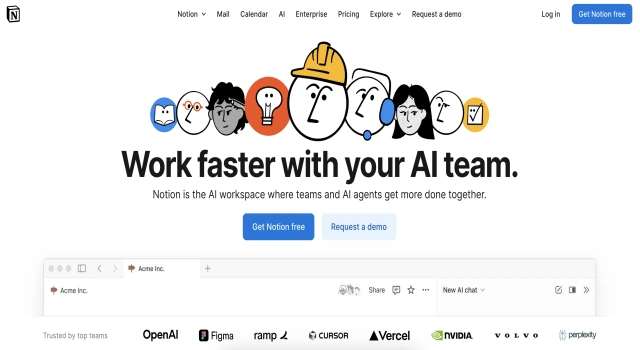
Notion is an all-in-one workspace for notes, tasks, and wikis.

What Is Notion?

Notion is a flexible all-in-one workspace where you can write, plan, collaborate, and organize. It combines note-taking, databases, task management, and more into one customizable platform, ideal for both individuals and teams.

Key Features

Notion helps you centralize work, knowledge, and collaboration.

  • Docs and notes: Write structured or free-form content in a clean editor
  • Databases: Organize content with tables, kanban boards, calendars, and lists
  • Tasks and project views: Track workflows with to-dos, statuses, and priorities
  • Collaboration: Share pages, comment, and work in real time
  • Templates: Use or create templates for productivity, CRM, or documentation
  • AI features: Summarize, generate, or rephrase content with built-in AI tools

Who Is Notion Best For?

Notion is great for anyone who needs a customizable digital workspace.

  • Students: Take notes, manage classes, and plan assignments
  • Freelancers: Track clients, tasks, and invoices
  • Startups: Build wikis, product roadmaps, and team tasks
  • Creators: Organize content ideas and publishing workflows
  • Teams: Share knowledge and collaborate on projects

Pros

  • Extremely versatile and flexible
  • Combines many tools into one
  • Rich content blocks and customization
  • Growing ecosystem and integrations
  • Free tier is generous

Cons

  • Learning curve for beginners
  • Can be overwhelming to set up
  • Offline access is limited
  • Performance can lag with large databases
  • Some advanced features only in paid plans'

Final Verdict: Is Notion Worth It?

Notion is a powerful all-in-one platform for productivity and collaboration. Its flexibility makes it suitable for nearly any use case, though it may take time to master. If you're looking to unify your docs, tasks, and knowledge base, Notion is a top contender.

How to Use Notion: Step by Step

Follow these steps to get started with Notion:

  1. Go to notion.so and create a free account
  2. Create a new workspace or join a team workspace
  3. Start with a page and add blocks for text, headings, checklists, or databases
  4. Explore templates for wikis, planners, task boards, and more
  5. Share pages with teammates or collaborators
  6. Use the AI assistant to generate summaries, content, or help write
  7. Organize pages into folders and favorites for easy navigation

FAQ

Can Notion Connect with Other Tools?
Yes. Notion integrates with apps like Zapier, Slack, Google Calendar, and provides APIs and automation features for workflows.

Is Notion Free to Use?
Notion offers a free personal plan with basic features; paid tiers unlock collaboration, admin tools, and AI capabilities.

What's the Difference Between Pages and Databases?
Pages are free-form content blocks for text, embeds, or files, while Databases provide structured tables, boards, lists, and gallery views with filtering and relationships.

Scroll to Top