Miro AI

Related Tool Collections
What Is Miro AI?
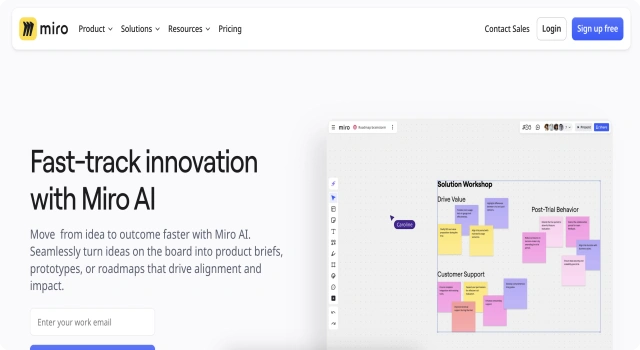
Miro AI adds intelligence to your whiteboarding sessions. From clustering sticky notes to summarizing ideas, it supercharges creative collaboration.
Key Features
Miro AI enhances your whiteboard sessions with smart clustering, summarization, and idea extraction—perfect for team workshops.
- Automatically group sticky notes into categories
- Summarize boards and extract next steps
- Use AI to find insights from messy brainstorms
- Supports real-time collaboration and feedback
- Integrated into the Miro whiteboard platform
Who Is Miro AI Best For?
Miro AI fits teams that collaborate visually and need help organizing big ideas.
- Product teams running brainstorming workshops
- Agile teams capturing sprint ideas and goals
- Facilitators turning raw input into clear outcomes
Pros
- Automatically groups and summarizes brainstorming notes
- Integrates with Miro’s whiteboard features
- Improves clarity and next steps in team meetings
Cons
- Requires Miro account to use
- AI features limited on free plan
- Less useful outside structured brainstorming
Final Verdict: Is Miro AI Worth It?
Miro AI helps teams turn chaos into clarity. If you brainstorm often, this is a must-try upgrade to Miro’s already-great platform.
How to Use Miro AI: Step by Step
Miro AI makes whiteboarding more productive through smart features:
- Log in to your Miro account at www.miro.com
- Create or open a whiteboard with sticky notes or text
- Enable AI to cluster related ideas or summarize notes
- Highlight key insights and next steps using prompts
- Share the board with collaborators in real time
- Use Miro AI to plan, brainstorm, or reflect effectively
FAQ
What does Miro AI do?
Miro AI helps organize sticky notes, summarize boards, and spot insights.
Do I need a paid plan to use Miro AI?
AI features are limited on the free plan and more powerful on paid tiers.
Can it replace manual board sorting?
Yes, Miro AI can automatically group and analyze brainstormed content.