Runway

Runway

AI platform for image and video generation

What Is Runway?

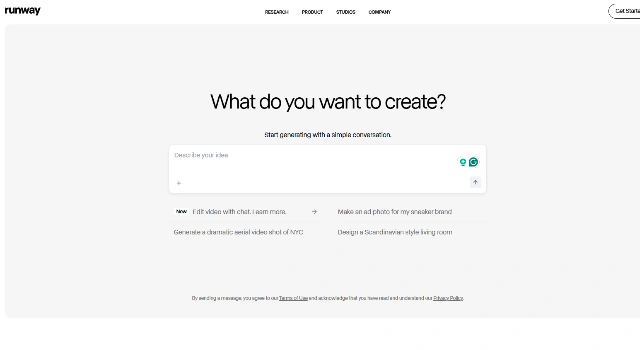
Runway is a creative suite for AI image and video generation. Beyond text‑to‑image, its Gen‑2 model creates short videos from prompts and supports advanced editing.

Built for creators and teams making marketing assets, clips, and prototypes.

Key Features

Runway stands out for modern content teams because of:

  • Gen‑2 Text‑to‑Video – Turn prompts into short, stylized video clips.
  • Pro Editing Suite – Inpainting, tracking, and advanced effects for media.
  • Background Removal – Fast, accurate “Green Screen” for people and objects.
  • Team Collaboration – Shared assets and projects across teammates.
  • Export Pipelines – Publish to common formats for production.

Who Is Runway Best For?

Runway is best for people producing modern video and social content with AI:

  • Video editors and motion designers
  • Marketing teams making short clips and ads
  • Social media creators prototyping fast
  • Studios exploring text‑to‑video workflows

Pros

  • Gen‑2 Video – Text‑to‑video for short clips and concepts.
  • Pro Editing – Inpainting, tracking, effects in one place.
  • Smart Cutouts – Fast, accurate background removal.
  • Team‑Ready – Share assets and timelines with collaborators.
  • Flexible Export – Output to common media formats.

Cons

  • Free Tier Limits – Credits and exports are constrained.
  • Scaling Costs – Bigger projects can get expensive.
  • Cloud Reliance – Needs strong, stable internet.
  • Video Variability – Text‑to‑video quality depends on prompts.
  • Tool Sprawl – Many modules to learn.

Final Verdict: Is Runway Worth It?

Runway is a compelling all‑in‑one for modern creators, especially if video is part of your mix. Gen‑2 text‑to‑video and solid editing tools make it strong for social content and prototypes, with paid tiers needed for heavier workloads.

How to Use Runway: Step by Step

Generate and edit images/videos in a unified suite.

  1. Sign up at Runway and choose an AI tool (e.g., Gen‑2 for video).
  2. Enter a prompt or upload media; tweak settings and masks.
  3. Export your asset in the desired format for publishing.

FAQ

Does Runway do text‑to‑video?
Yes. Gen‑2 turns prompts into short video clips.

Is there a free plan?
Yes, with limited credits and export constraints.

Can I remove backgrounds?
Yes. The Green Screen tool quickly isolates subjects.

Do I need a powerful computer?
Most features run in the cloud; a stable connection is more important.

Can I use results commercially?
Generally yes; verify license terms for your plan and features.

Scroll to Top