Fotor

Fotor

Online AI photo editor and image generator

What Is Fotor?

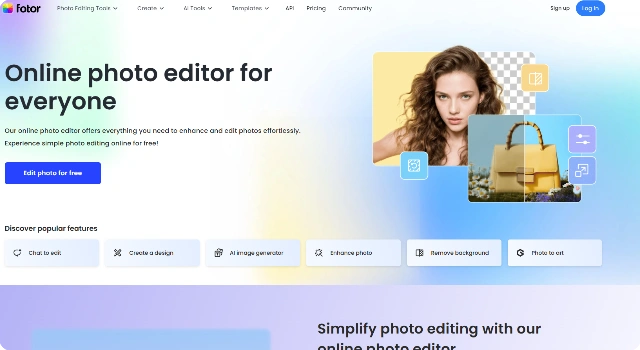
Fotor is an online photo editor with an AI image generator. It combines quick text‑to‑image creation with templates, retouching, and design tools.

Useful for social media visuals, simple ads, and lightweight edits.

Key Features

Fotor is a practical choice for everyday visuals because of:

  • All‑in‑One Editor – AI image generation plus photo retouching and design.
  • Templates & Collages – Ready‑made layouts for ads and social posts.
  • Quick Retouch – One‑click portrait fixes and lighting adjustments.
  • AI Effects – Artistic filters and styles for distinctive looks.
  • Cross‑Platform – Web and mobile apps for on‑the‑go edits.

Who Is Fotor Best For?

Fotor is best for people who want quick designs and simple photo edits:

  • Small businesses making social posts and ads
  • Non‑designers who need templates and easy tools
  • Influencers and creators working on mobile
  • Anyone needing fast one‑click retouching

Pros

  • All‑in‑One Toolkit – AI generation, retouching, and layouts together.
  • Ready Templates – Fast social posts, ads, and collages.
  • Beginner‑Oriented – Simple controls and one‑click fixes.
  • Mobile + Web – Create anywhere on phone or browser.
  • Low Entry Cost – Useful free tier; paid adds more.

Cons

  • Limited Precision – Fewer advanced controls for pro edits.
  • Occasional Artifacts – Complex prompts can degrade quality.
  • Paywalled Tools – Many capabilities sit behind Pro.
  • Masking Limits – Less granular region control.
  • Template Boundaries – Layouts can feel restrictive.

Final Verdict: Is Fotor Worth It?

Fotor blends AI image generation with practical photo editing and templates. It’s ideal for small teams and creators who need quick, decent visuals without learning complex tools—though power users may outgrow its precision controls.

How to Use Fotor: Step by Step

Generate, edit, and design in a single workspace.

  1. Open Fotor and choose AI Image Generator or Photo Editor.
  2. Enter a text prompt or upload a photo; apply effects or templates.
  3. Export your image for social posts, ads, or print.

FAQ

Is Fotor free?
Yes. A free plan is available; Pro unlocks extra tools and assets.

Does Fotor have mobile apps?
Yes. iOS and Android apps complement the web editor.

Can I remove backgrounds?
Yes. Use the built‑in background remover for quick cutouts.

Are Fotor images licensed for commercial use?
Usually yes, but review Fotor’s license and any stock asset terms.

What’s the export quality?
Export sizes depend on your plan and the selected template or canvas.

Scroll to Top