Plottr

Plottr

Visual outlining for plots, timelines, and arcs, with light AI
macOS
macOS
Web Platform Icon
Web
Windows Platform Icon
Windows

Related Tool Collections

Plottr Alternatives

What Is Plottr?

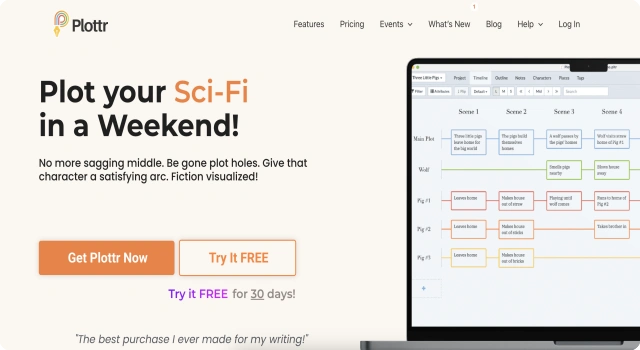
Plottr is a visual outlining tool for planning novels and series. It helps you map timelines, beats, and character arcs with drag-and-drop boards and ready-made templates (e.g., common story structures), plus sheets for characters, settings, and notes.

Ideal for pre-draft planning and continuity, Plottr makes it easier to track subplots, foreshadowing, and series-level threads. When your outline is ready, you can export it to your drafting app and use Plottr as your living story bible.

Key Features

Plottr is a visual planner for outlining novels and series before you draft, helping you map beats, timelines, and character arcs.

  • Timelines & beats: Lay out plots, subplots, and POV threads on boards.
  • Templates: Use popular story frameworks as structured starting points.
  • Character & scene sheets: Keep bios, notes, and scene details organized.
  • Series planning: Track continuity and foreshadowing across multiple books.
  • Export outlines: Send beats to your drafting app when you’re ready to write.

Who Is Plottr Best For?

  • Outliners & planners: Map plots and subplots on visual timelines before drafting.
  • Series authors: Maintain continuity, foreshadowing, and arcs across multiple books.
  • Multi-POV storytellers: Track threads across viewpoints and keep beats aligned.
  • Structure seekers: Start with proven templates like Hero’s Journey or Snowflake.
  • Continuity-focused writers: Link characters, settings, and scenes to avoid inconsistencies.
  • Coaches & collaborators: Share outlines for feedback and adjust boards together.

Pros

  • Visual timelines and boards make complex plots manageable.
  • Starter templates (e.g., Hero’s Journey, Snowflake) speed planning.
  • Strong tracking of subplots, POVs, and beats across chapters.
  • Character and scene sheets keep your story bible organized.
  • Series planning tools help maintain continuity across books.

Cons

  • Not a drafting editor; you’ll still need a writing app for prose.
  • No free plan; paid license or subscription required.
  • Complex boards/timelines can have a learning curve.
  • Collaboration/export mapping may require setup to match your workflow.
  • AI is assistive for planning, not long-form generation.

Final Verdict: Is Plottr Worth It?

The standout choice for visual planning and series continuity. Map timelines, beats, and arcs with clarity, then export your outline to a drafting app—ideal for outliners and multi-book projects.

How to Use Plottr: Step by Step

Plottr lets you plan novels visually with timelines, beats, and character arcs:

  1. Open plottr.com (or the desktop app) and create a new project
  2. Choose a structure template (e.g., Hero’s Journey) or start from scratch
  3. Lay out timelines and beats for plots, subplots, and POVs
  4. Add character and scene cards; attach notes and research
  5. Rearrange beats via drag-and-drop to fix pacing and continuity
  6. Export the outline to your drafting app when you’re ready to write

FAQ

Does Plottr export to Word or Scrivener?
Yes. You can export outlines and project data to Microsoft Word and Scrivener from the Timeline/Outline views.

Are there built-in plotting templates?
Yes. Plottr includes 30+ templates such as the Hero’s Journey and Snowflake Method.

Scroll to Top