Todoist

Todoist

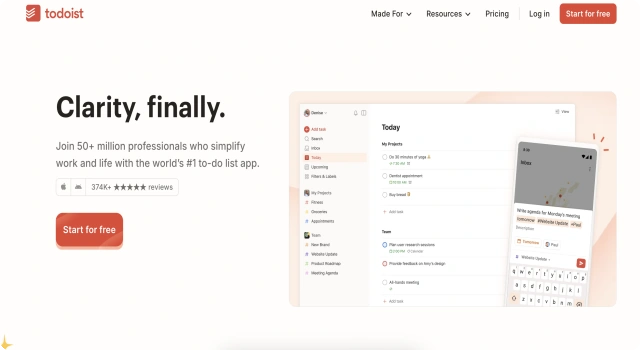
Todoist is a task manager for organizing and tracking daily to-dos.
Android Platform Icon
Android
Browser Platform Icon
Browser Extension
iOS Icon
iOS
macOS
macOS
Web Platform Icon
Web
Windows Platform Icon
Windows

What Is Todoist?

Todoist is a powerful task management app designed to help users organize their work and life. With smart features like natural language recognition, labels, and filters, it offers a clean, flexible interface for individuals and teams to stay on top of their tasks.

Key Features

Todoist blends simplicity with depth to streamline productivity.

  • Smart task entry: Add tasks with natural language (e.g., 'Meeting tomorrow at 10am')
  • Projects and subtasks: Organize work into structured lists
  • Priorities and filters: Focus on what matters most
  • Reminders and recurring tasks: Stay consistent with routines
  • Collaboration: Share tasks and assign roles with team members
  • Multi-platform access: Syncs across all major devices

Who Is Todoist Best For?

Todoist suits anyone needing a reliable way to track tasks and projects.

  • Professionals: Manage work and projects efficiently
  • Students: Stay on top of assignments and deadlines
  • Teams: Collaborate and assign shared tasks
  • Freelancers: Keep track of clients and deliverables
  • Habit builders: Use recurring tasks for personal goals

Pros

  • Simple yet feature-rich interface
  • Cross-platform and cloud-synced
  • Great for individuals and teams
  • Natural language input saves time
  • Active community and helpful templates

Cons

  • Some features locked behind paywall
  • Learning curve for filters and advanced features
  • No built-in time tracking
  • Limited project views (no Kanban without boards)
  • Task dependencies require workarounds'

Final Verdict: Is Todoist Worth It?

Todoist is one of the best all-around task managers available, offering a clean interface, smart features, and reliable performance. It's suitable for personal productivity and team collaboration, making it a top pick for anyone who wants to stay organized and productive.

How to Use Todoist: Step by Step

Follow these steps to get started with Todoist:

  1. Visit todoist.com or download the app on your device
  2. Sign up for a free account
  3. Create your first project and add tasks
  4. Use natural language to set due dates (e.g., 'Submit report Friday')
  5. Add labels, priorities, and reminders
  6. Share projects with collaborators if needed
  7. Upgrade to Pro for filters, views, and advanced organization

FAQ

Can I Use Teams in Todoist?
Yes. Todoist supports shared team projects, and you can manage roles like admin, member, and guest in its workspace model.

How Do I Troubleshoot Access Issues?
If you don’t see teams or features, refresh the app, log out and back in, or update to the latest version.

Is Todoist Good for Teams?
Yes. Teams benefit from shared projects, comments, file attachments, and a simple interface with powerful collaboration.

Scroll to Top